AI today can understand and generate language, write and review code, analyze images and video, find patterns in large datasets and complete multistep tasks through AI agents. It still struggles with judgment, accountability and anything that requires real understanding of context it has never seen. This guide covers the main AI capabilities, the tasks AI can perform at work and in daily life, real examples and the limits that still matter.
Key insights
- Five core capabilities: language, code, vision and speech, prediction and autonomous action through AI agents.
- At work: 88% of organizations already use AI in at least one business function, mostly for repetitive, high-volume tasks.
- Biggest shift: AI has moved from answering questions to completing multistep tasks with tools and data.
- Main limits: confident wrong answers, weak judgment in new situations and dependence on data quality.
- Best results: companies that start with one clear problem, keep people in the loop and measure outcomes.
AI capabilities today
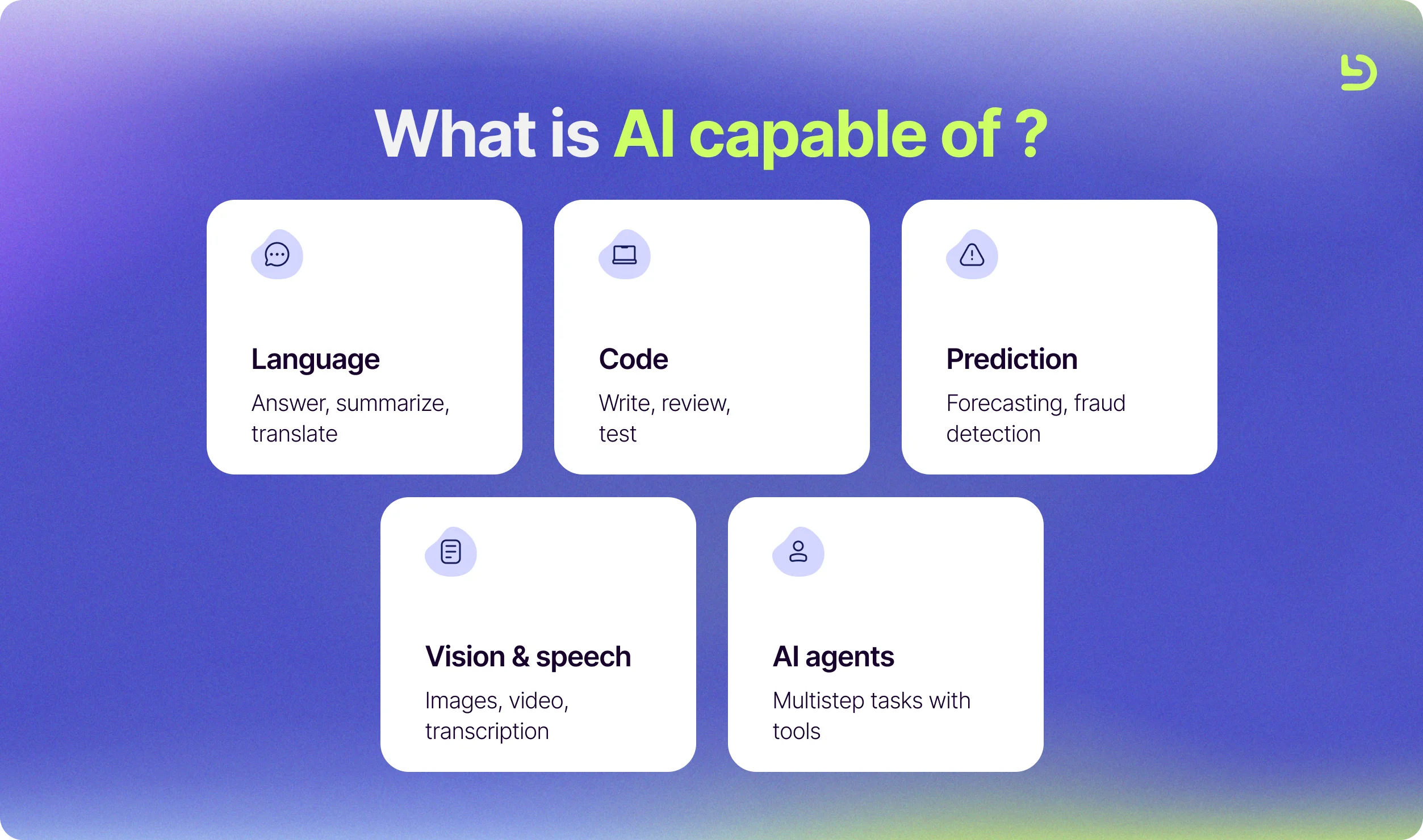
Modern artificial intelligence capabilities fall into five broad groups. Most real products combine several of them.
According to Stanford's 2026 AI Index, AI models now meet or exceed human baselines on PhD-level science questions, competition mathematics and multimodal reasoning, yet they still fail at some simple tasks, such as reading an analog clock.
1. Understanding and generating language
Large language models can read, write and reason over text. They answer questions, summarize long documents, translate between languages, draft emails and reports, and extract structured data from contracts or forms. This is the capability most people meet first, through chat assistants.
2. Writing and reviewing code
AI can generate functions, explain unfamiliar code, write tests, suggest fixes and review pull requests. It does not replace engineers, but it changes how they spend their time, with less effort on boilerplate and more on design, review and problem solving. On the SWE-bench Verified coding benchmark, performance rose from about 60% to close to 100% in a single year, according to the same Stanford report.
3. Seeing and hearing
Computer vision and speech models recognize objects in images and video, read text from scanned documents, transcribe meetings and generate natural-sounding voice. They power quality inspection in factories, medical imaging support, accessibility tools and voice interfaces.
4. Predicting and recommending
Machine learning models find patterns in historical data to forecast what comes next. They estimate demand, detect fraudulent transactions, predict churn, rank search results and personalize recommendations on streaming and shopping platforms.
5. Taking action through AI agents
AI agents combine a language model with tools, data and instructions so they can complete tasks with several steps on their own, such as researching a topic, updating a CRM or triaging support tickets. This is the fastest-moving area of AI today. In McKinsey's State of AI 2025 survey, 62% of organizations said they were at least experimenting with AI agents, and 23% were already scaling them in at least one part of the business.
AI capabilities at a glance
This table summarizes what each capability can do today, where you see it in practice and where people still need to stay involved.
What can AI do? Tasks AI can perform at work
In practice, these capabilities translate into tasks that companies already hand to AI every day. Adoption is already broad. In McKinsey's 2025 survey, 88% of organizations reported using AI regularly in at least one business function, up from 78% a year earlier, although only about a third have started to scale it across the whole company. The common thread is that AI handles the repetitive, high-volume part of the work while people keep the judgment calls.
- Customer support: answering common questions, routing tickets and drafting replies for agents to review.
- Sales: researching accounts, enriching leads and summarizing calls.
- Marketing: drafting content, repurposing it for different channels and analyzing campaign results.
- Finance: flagging unusual transactions, reconciling data and preparing first drafts of reports.
- HR and recruiting: screening applications, scheduling interviews and answering policy questions.
- Software engineering: writing and reviewing code, generating tests, documenting systems and investigating bugs.
- Operations: extracting data from documents, forecasting demand and monitoring systems for anomalies.
What can AI do for you in daily life?
Outside work, the same capabilities show up in everyday tools. AI can help you write and edit messages, summarize long articles, plan a trip, learn a new topic step by step, translate a conversation, organize notes and get a first answer to almost any question. The best way to use it is as a fast first draft or a thinking partner, while you check anything important.
How AI capabilities have changed
A few years ago, most AI in everyday products was narrow, built to do one task such as filtering spam or recommending a movie. The launch of ChatGPT in November 2022 brought general-purpose language models to the mainstream. Since then, models have learned to work with images and audio as well as text, handle much longer documents, write production-quality code and use tools to take action. Generative AI reached 53% of the population within three years, faster than the personal computer or the internet, according to Stanford's AI Index. The shift from answering questions to completing tasks is what defines AI capabilities today.
Real examples of AI applications
These are some of the AI applications where you can see these capabilities at work.
Large language models
Large language models (LLMs) such as OpenAI's GPT models, Anthropic's Claude and Google's Gemini understand and generate natural language. They answer questions, summarize long documents, translate between languages and write code. Companies use them for customer support, internal knowledge search, content drafting and software development, usually connected to their own data and tools.
AI coding assistants
Coding assistants such as GitHub Copilot and Claude Code help developers write, explain, test and refactor code. They have changed how engineering teams work, and knowing how to use them well is becoming part of what makes a strong engineer.
AI agents
AI agents combine a language model with tools, data and instructions so they can complete tasks with several steps, such as researching a topic, updating a CRM or triaging support tickets. More advanced setups use several specialized agents that hand work to each other. We saw this trend everywhere at Ai4 2026.
Algolia
Algolia matches search results to the meaning of a query as well as its keywords. This lets online stores and content sites show users what they are looking for even when they phrase it differently from the product or article title.
Jasper
Jasper is an AI writing platform built for marketing teams. It generates drafts for blog posts, ads and emails from templates, and can be configured with a company's brand voice and style guidelines.
AI in everyday life: virtual assistants
A virtual assistant is a software agent that helps users complete tasks, usually through voice, although you can also interact with it through text.
Siri
Siri is Apple's virtual assistant for iOS, macOS, tvOS and watchOS. It uses natural language processing to answer questions, make recommendations and take action by delegating requests to a set of services that has grown over time.
Alexa
Alexa is a virtual assistant developed by Amazon, first used in the Amazon Echo smart speaker. It controls smart home devices, plays media, manages shopping lists and answers questions.
Google Assistant and Gemini
Google's assistant is moving from command-based answers to conversations powered by its Gemini models, which can reason over a user's email, calendar and documents when given access.
Autonomous vehicles
An autonomous vehicle can perceive the environment around it and navigate without a human driver. The driver can choose a destination but is not required to operate the vehicle.
Today, Waymo operates fully driverless robotaxi services in several US cities. Tesla and Mercedes-Benz offer advanced driver assistance systems, and Mercedes-Benz Drive Pilot was among the first Level 3 systems approved for use on public roads, allowing the driver to take their eyes off the road in specific conditions.
Libraries developers use to build AI
As demand for artificial intelligence technologies grows, more developers work with these libraries to build and train AI models. In production, models built with them are usually packaged and deployed in containers, and our guide on how Docker works explains the basics.
- PyTorch: This is an open-source machine learning library for Python that offers flexibility and speed for deep learning. It is the most widely used framework in AI research and powers many of today's large models.
- TensorFlow: An open-source library for machine learning developed by Google to build and train neural networks. It is widely used in production systems and offers tools for deploying models on servers, mobile devices and the web.
- Keras: An open-source neural network library written in Python. Since Keras 3, it can run on top of TensorFlow, JAX or PyTorch. Its strengths are being user-friendly, modular and extensible, which makes it a good starting point for deep learning.
- Scikit-learn: A free machine learning library for Python. It includes classification, regression and clustering algorithms such as support vector machines, random forests, gradient boosting, K-means and DBSCAN, and works with the numerical libraries NumPy and SciPy.
What AI still can't do well
AI is powerful, but it has clear limits that every team should plan for.
- Confident mistakes. Models can produce answers that sound right but are wrong, so important output needs review.
- Judgment and accountability. AI cannot take responsibility for decisions, especially ones that affect people, money or safety.
- New situations. Performance drops when a problem looks very different from the data the model was trained on.
- Data quality and privacy. Results are only as good as the data AI receives, and sensitive data needs clear access rules.
- The physical world. Robots still struggle with tasks that require fine motor skills in unpredictable environments.
These risks show up in practice. In McKinsey's 2025 survey, 51% of organizations reported at least one negative consequence from AI use in the past year, with inaccuracy the most common. That is why most successful AI projects keep people in the loop and measure results before scaling.
How to start using AI in your company
The companies that get the most from AI tend to follow the same path.
- Pick one clear problem with a measurable outcome, such as reducing response time in support.
- Check your data and decide what the AI can and cannot access.
- Start small with one team or workflow before rolling it out more widely.
- Keep a person in the loop to review output and handle exceptions.
- Measure and adjust before adding more tools or use cases.
- Build the skills on your team, since engineers who know how to work with AI make the biggest difference.
Conclusion
AI is already part of daily life, from text prediction and search engines to coding assistants and AI agents that complete entire workflows. The companies getting the most value from it apply AI to specific problems and measure the outcome before adopting more tools.
Devlane works with US companies as a nearshore technology partner. Teams bring us in to add senior LATAM engineers with machine learning and AI experience through staff augmentation, or to build AI features and products end to end with custom software development.

Frequently asked questions
What is AI capable of today?
AI today can understand and generate language, write and review code, recognize images and speech, make predictions from data and complete multistep tasks through AI agents. It still needs people to check its output and make final decisions.
What are the main AI capabilities?
The main AI capabilities are understanding and generating language, writing and reviewing code, computer vision and speech recognition, prediction and recommendation, and taking action through AI agents.
What can AI do at work?
AI can answer common support questions, research leads, draft marketing content, flag unusual transactions, screen applications, write and review code and extract data from documents. It works best on repetitive, high-volume tasks with a person reviewing the result.
What will AI never be able to do?
AI will likely never replicate human consciousness, emotions, true creativity or moral reasoning, as these rely on subjective experiences and context AI cannot fully grasp.
What are examples of AI in everyday life?
Common examples include virtual assistants like Siri and Alexa, recommendations on streaming and shopping platforms, spam filters, navigation apps, text prediction on phones and chat assistants built on large language models.
How are companies using AI agents?
Companies use AI agents to automate tasks with several steps, such as answering support tickets, researching leads, updating internal systems and reviewing code. The most successful teams start with one clear use case, measure the results and then expand.

Other Blog Posts
Forward Deployed Engineer: What the Role Is and Why AI Is Driving Demand

Cybersecurity in the era of AI: what engineering leaders told us about AI agent security


What agentic AI means, and how to introduce it into your software development projects