Key insights
- Agentic AI is not just a more powerful chatbot. The main difference is how much freedom the model has to determine what happens next.
- Not every AI feature needs an agent. If the sequence is predictable, a workflow is usually easier to build, test, secure, and maintain.
- The best first use cases have outcomes you can verify automatically. If there is no reliable way to tell whether the agent succeeded, giving it more autonomy becomes much harder to justify.
- Security has to be part of the architecture from the beginning. Tool permissions, credentials, external inputs, logging, and approval layers matter as much as the model itself.
- Start narrow. One task, limited tools, clear boundaries, and enough observability to understand exactly what happened when something goes wrong.
Introduction
When working on software development projects for clients, the term "agentic" is coming up more and more often, whether it's part of a product roadmap, a technical discussion, or a request to introduce AI capabilities into an existing system. But while there's growing interest in building AI agents, there's not always a clear understanding of what that actually involves.
At that point, the temptation is to start building. In my experience, that's usually one step too early. Before choosing a model, framework, or orchestration layer, there's a more important question to answer: What should this system actually be allowed to do?
This becomes especially relevant when introducing agentic capabilities into a client's existing environment. You're not building in isolation. There are production systems, customer data, established permissions, security requirements, existing APIs, and uptime commitments already in place.
Knowing how to call an LLM API is the easy part. The harder part is deciding how much autonomy makes sense within that environment and what controls need to exist around it. That's where the distinction between a regular AI feature and an agentic system starts to matter.
The real problem is ambition without a definition
One of the first problems I usually see with agentic initiatives is that different people are using the word "agent" to describe completely different things.
One stakeholder may be imagining a chatbot that answers questions. Another may expect a system that searches multiple sources, chooses tools, executes actions, evaluates the results, and continues working without being told exactly what to do next.
Those are very different systems. When that distinction is not made early, it is easy to build a prototype that looks impressive during a demo but becomes difficult to move into production. I have seen the kinds of questions that appear immediately once an experiment gets closer to a real client environment:
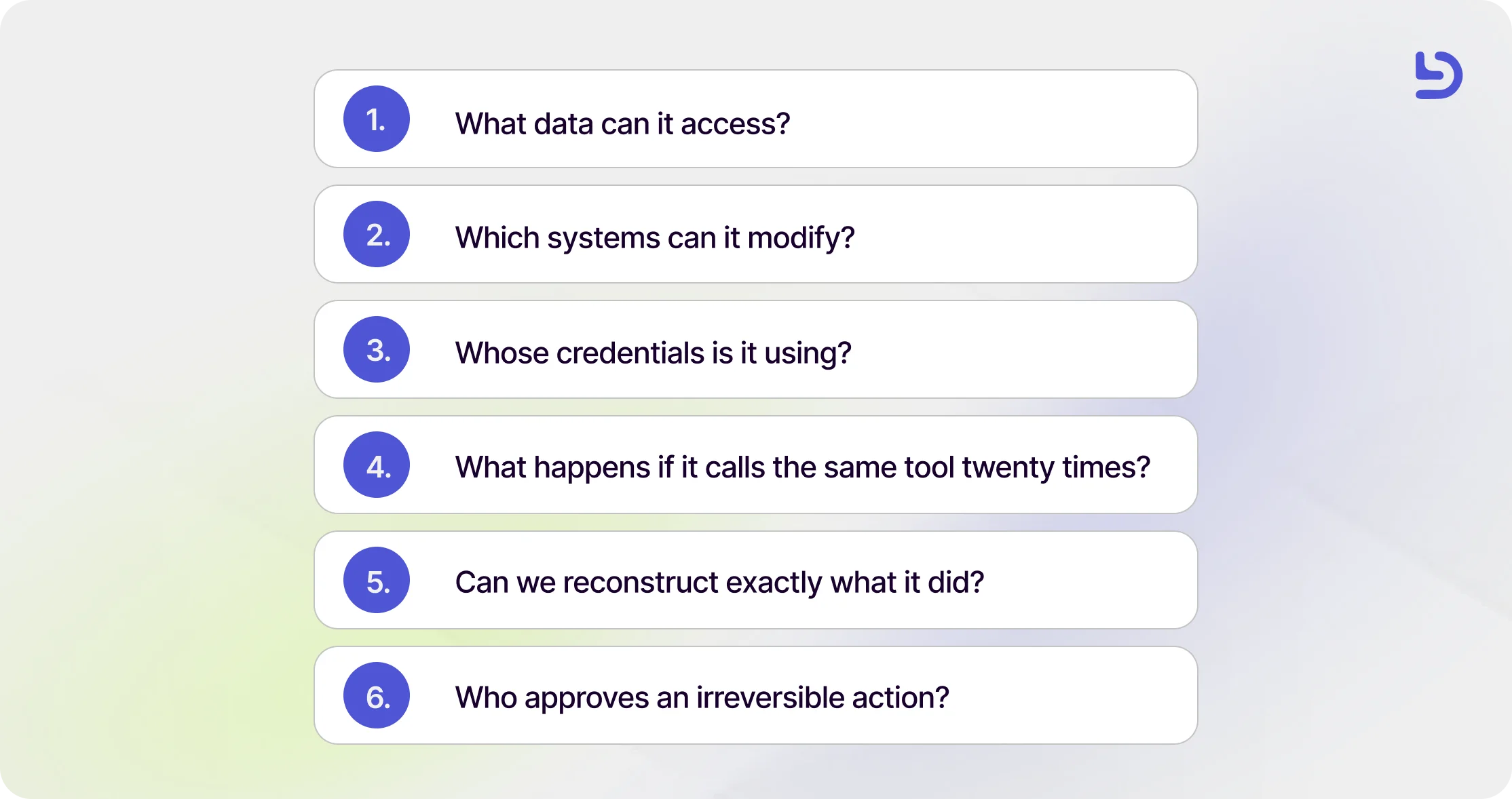
Those questions are much harder to answer after the architecture has already been built.
There is also a cost dimension that is easy to underestimate during a prototype. A 2026 Microsoft study of command line coding agents found that adopters merged approximately 24% more pull requests, while also highlighting that token spending across large engineering organizations can reach millions of dollars annually.
More autonomy can create more value, but it can also create more activity. Those are not automatically the same thing. That is why one of the first things I try to establish in a project is what kind of AI integration the team actually needs.
What are the different types of AI integration?
A practical way to distinguish AI integrations is to look at who determines what happens next. We generally think about them in three broad categories.
1. The assistant
An assistant responds to a request. Your application sends information to the model, receives an answer, and then your code decides what happens next.
A summarization feature is an assistant. A copy suggestion inside a product can be an assistant. A feature that generates a description from structured information can also follow this pattern.
The model contributes intelligence to one part of the experience, but it does not own the process around it. That makes assistants relatively straightforward to reason about because the application continues to control the sequence.
2. The workflow
A workflow introduces AI into several steps, but the path itself is still defined by the engineering team.
Imagine a support process that:
- Classifies an incoming ticket.
- Determines which team should receive it.
- Retrieves relevant information.
- Drafts a suggested response.
The model may make decisions inside several of those steps, but the sequence and possible branches were established before the request arrived.
I tend to use this pattern because it gives teams many of the advantages of AI without giving up predictability where it is not necessary.
If you can describe the process reliably ahead of time, there is often little benefit in asking an agent to rediscover that process every time.
The model can make judgments inside the workflow while the application continues to own the workflow itself.
3. The agent
An agent is useful when the path cannot be fully determined in advance. Instead of receiving one instruction and returning one result, the agent receives a goal, access to a defined set of tools, information about its environment, and rules that constrain what it can do.
It can then choose an action, observe what happened, determine the next action, and continue until it reaches a stopping condition. That flexibility is the important part. An agent does not need to follow exactly the same sequence every time.
If it is investigating an application error, for example, one incident might require checking deployment history first while another might lead it toward logs, traces, a feature flag, or a database record.
This is also why describing an agent as simply "the model owning the control flow" is incomplete. In production, the model should have freedom inside boundaries established by the application.
The engineering team still determines which tools exist, what each tool can access, which actions require approval, how long the agent can run, how much it can spend, and what happens when it fails.
The agent decides how to navigate within those boundaries. That is where most of the useful autonomy comes from.
Does AI learn from your data?
Another question I hear regularly from clients is some version of: "Are we training the AI on our code or our proprietary data?"
For most applications using commercial models through an API, what developers experience as "the model knowing our information" is usually context, not training. You provide relevant information during the request, and the model uses that information to generate its response.
If the application needs information to persist across sessions, then the engineering team usually builds some form of memory or retrieval layer around the model. From my perspective, that memory should be treated exactly as what it is: another data store.
If an application stores customer conversations, code, previous decisions, documentation, preferences, or account information so that an agent can retrieve it later, the important questions are familiar engineering questions:
- Where is that information stored?
- Who can access it?
- How long is it retained?
- Can it cross tenants?
- What gets logged?
Once we frame it that way, the architecture becomes much easier to reason about. There is nothing uniquely mysterious about AI memory from a security perspective. If you persist information, you are responsible for securing that information.
Where agentic AI actually helps
We have found that agentic approaches are strongest when the path varies, several actions may be required, and there is a good way to evaluate the result. All three matter.
Incident investigation is a good example. An engineer investigating a production issue does not always know at the beginning whether the problem is in application code, infrastructure, a dependency, a recent deployment, or corrupted data. An agent can potentially inspect different sources depending on what it finds along the way.
Another useful example is a code migration across a large repository. Some files may require slightly different changes, so a fully rigid sequence is difficult to define. At the same time, tests, static analysis, compilation, or schema validation give the agent a concrete way to determine whether its work succeeded. That feedback loop matters enormously.
A simple test I use
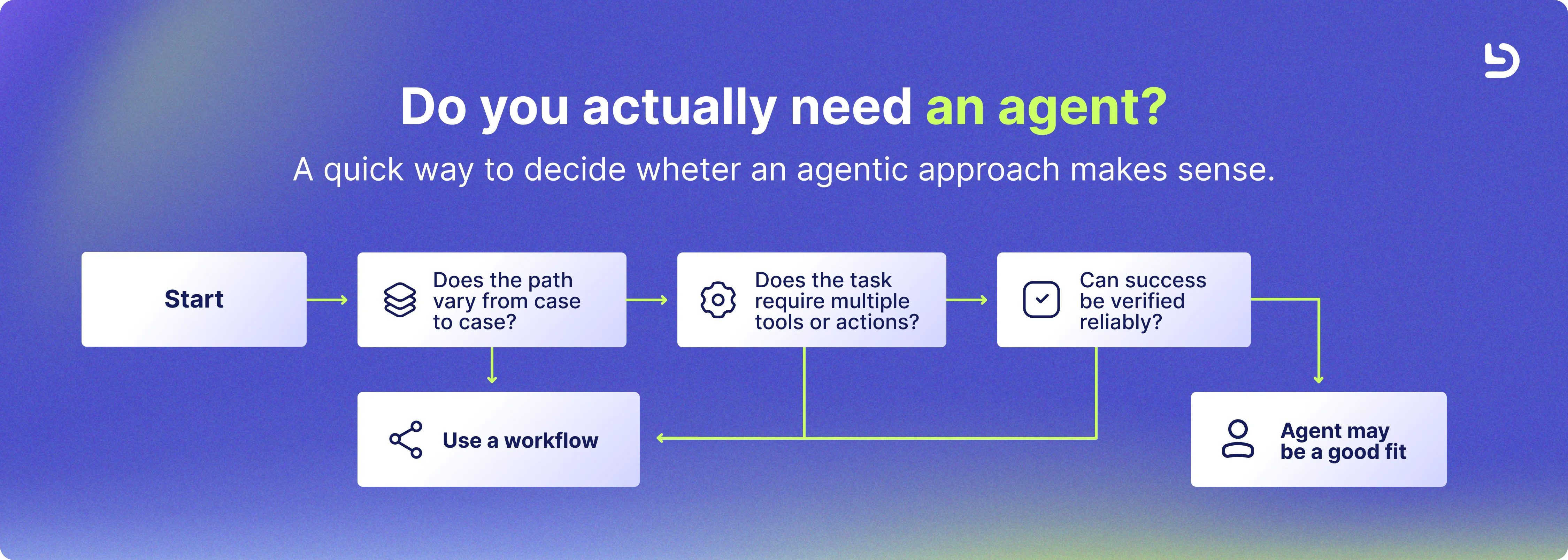
One test I use a lot before deciding whether something should become agentic is asking myself three questions:
- Does the path change depending on what the system discovers?
- Does completing the task require multiple tools or decisions?
- Can the result be objectively checked?
If the answer is yes to all three, an agent is worth considering. If the process always follows the same sequence, I usually prefer a workflow. If the output requires a person to carefully review everything before anyone can tell whether it worked, I become much more conservative about the level of autonomy I introduce.
And if the agent can perform high-value, destructive, financial, or irreversible actions, I don’t treat human approval as an inconvenience. I treat it as part of the architecture.
How to introduce agentic AI into a client project
When we introduce AI into an existing client product, the model is only one part of the implementation. The architecture around it usually determines whether the feature can actually reach production.
1. Start with a task that has a checkable outcome
One of the best constraints you can introduce early is choosing a task where success can be evaluated objectively.
- Tests pass.
- A schema validates.
- Two systems reconcile.
- A file was migrated correctly.
- A generated configuration satisfies a known set of rules.
This creates a useful feedback loop. The agent acts, the system checks the result, and that evaluation can determine what happens next.
If we cannot define how success will be measured, we are usually more conservative about how much autonomy we give the system.
This is also why testing becomes especially important in AI development. AI can accelerate testing and test generation, but human judgment is still necessary around edge cases and product risk. You can read more about this in How to Use AI to Become a Better QA Engineer.
2. Give it the minimum tools it needs
During a prototype, it is tempting to give an agent access to many tools because it makes experimentation easier. In production, every additional tool increases the number of actions the system can take.
OWASP identifies Tool Misuse and Exploitation as ASI02 in its Top 10 for Agentic Applications. The risk is not only unauthorized access. An agent can also use a legitimate tool in an unexpected way.
If it only needs to inspect certain customer records, it may not need every customer field. If it needs to update one object type, it probably does not need unrestricted database access.
I start with the least privilege the use case allows and expand access only when there is a clear reason to do so. Read-only access is often a good place to begin.
3. Separate planning from execution
A useful architecture pattern is allowing the model to recommend an action without automatically giving it permission to execute it. An agent might determine that an account should be suspended because certain conditions are present. That does not mean the agent itself needs permission to suspend the account.
A separate deterministic layer can verify whether the action is allowed, whether the necessary conditions are met, and whether human approval is required. AI can decide what it thinks should happen. The application should still decide what it is allowed to make happen.
For low-risk, read-only actions, that extra layer may not be necessary. For deleting data, changing infrastructure, modifying permissions, sending money, or communicating directly with customers, the threshold should be much higher.
4. Treat everything the agent reads as untrusted input
An agent may read a support ticket, email, website, document, Slack message, source code, or information returned by another tool. Any of that content can influence what the model does next.
OWASP identifies Agent Goal Hijack as ASI01 because external content can redirect an agent away from its intended objective. For that reason, we treat external content as untrusted input and design the system assuming that some of it may attempt to influence the agent's behavior.
Security needs to be considered from the beginning, especially when introducing AI into products that already contain customer or proprietary data. This is part of the same engineering approach we apply to custom software development, where architecture, security, and maintainability need to be addressed from the start.
5. Give the agent its own identity
A production agent should not operate through an engineer's personal credentials. If an agent performs an action, teams should be able to identify that action as automated and trace it back to the system that performed it.
That means using a dedicated identity, scoped permissions, appropriate credential rotation or expiration, and an audit trail that clearly separates automated activity from human activity.
When something goes wrong, the question “Who or what performed this action?” should have an obvious answer.
6. Log everything that matters and limit the blast radius
Agents can repeat actions. That seemingly simple characteristic changes the operational risk considerably. A function that fails once gives you one failure and an agent that interprets that failure incorrectly may call the function again, choose another tool, retry, or continue exploring. That is why observability cannot be added at the end.
We want to know:
- What goal was the agent given?
- What did it decide to do?
- Which tool did it call?
- What result came back?
- Why did it continue?
- How much did the run cost?
- Why did it stop?
Logs need to capture enough information to reconstruct what happened while still respecting sensitive data requirements. Then we add boundaries like rate limits, execution timeouts, token or spending limits, maximum iterations or other ways to stop the agent completely. The goal is to make sure unexpected behavior remains contained.
.webp)
What I've learned from integrating AI into software development
One of the main things I have learned from introducing AI into real engineering environments is that, as I mentioned earlier, the model itself quickly becomes only one part of the conversation.
Once a prototype works, the focus shifts to how the feature fits into the existing architecture, what happens when something fails, who can access what, how easy it is to monitor, and whether the value it creates justifies the cost of running it.
In practice, good AI implementation still depends on the same fundamentals that make any production system reliable. You still need thoughtful API design, solid testing, clear permissions, observability, secure infrastructure, and a strong understanding of the product you are building.
What changes is that you are now working with a component that is not fully deterministic, which makes evaluation and edge cases more important.
We see the same thing when we think about AI fluency in developers at Devlane. Knowing how to use an AI tool or write a good prompt is useful, but it is only part of the skill. What matters more is being able to recognize where AI can genuinely improve a system, understand how its output should be evaluated, and know when a simpler approach would be more appropriate. You can learn more about this approach in AI Fluency in Developers: How We Evaluate It at Devlane.
Common mistakes we see
1. Using more autonomy than the problem requires
One of the easiest mistakes to make is choosing an agent simply because the use case involves AI.
If the sequence is already known and predictable, a workflow is usually easier to test, secure, monitor, and debug. The model can still handle the parts that require classification, interpretation, generation, or judgment without deciding the entire process itself.
More autonomy does not automatically make a product more sophisticated. In many production systems, the strongest design gives AI flexibility where it is useful while keeping deterministic or human control around higher-risk decisions.
An agent might investigate an issue but require approval before changing infrastructure, prepare a customer response without sending it automatically, or recommend an action that another service validates before execution. If you can define the workflow clearly in advance, there should be a specific reason for giving the model control over that workflow instead.
2. Giving prototype permissions to production
Broad permissions can be useful during early experimentation because they make it easier to validate an idea quickly. The problem is when those temporary choices reach production unchanged.
Before an AI feature moves beyond the prototype stage, every tool, credential, and permission should be reviewed against what the final use case actually requires.
An agent that only needs to read a limited set of records should not retain broad database access simply because that was convenient during development. The same principle applies to APIs, internal tools, cloud permissions, and service accounts. Prototype convenience should not define the production security model.
3. Evaluating AI with perfect examples
AI features often look great when they are tested with clean, carefully selected examples. Real production data is rarely that cooperative.
Once a feature starts interacting with actual users and systems, it will encounter incomplete requests, unusual formatting, contradictory information, unexpected responses from external tools, and cases nobody considered during the initial demo.
That is why we prefer evaluating AI features with examples that actually resemble the environment where they will operate. A relatively small set of real or representative cases can expose weaknesses much faster than a generic benchmark.
The goal is not only to prove that the feature works when everything goes right. It is to understand how it behaves when the input is messy, ambiguous, or simply different from what the team expected.
4. Treating memory as a free feature
Adding memory can make an AI experience feel much more useful because the system can carry context from one interaction to another. But from an architecture perspective, memory is not just a convenience. As soon as information persists between sessions, you have created another data management responsibility.
The team needs to decide what gets stored, where it lives, how long it should remain there, who can access it, whether information is properly separated between customers or users, and how it can be deleted when necessary.
Thinking about memory as a data store rather than an invisible AI capability usually leads to much better decisions.
.webp)
How to get into AI as a developer
If you are a developer who wants to start working with AI, a good place to begin is with one small feature inside a system you already understand well.
That lets you focus on the parts that change when AI enters the architecture. Give the model access to one carefully scoped tool, define what a valid outcome looks like, and test it against a small set of real or representative cases.
Then start testing failure scenarios. What happens if the tool fails, the model returns the wrong structure, or the information it receives is incomplete? From there, add the same protections you would expect in any production system, including validation, logging, permissions, and clear failure handling.
As AI becomes more common in software development, the most valuable skill will be knowing when to use it, how to evaluate it, and how much responsibility to give it. That is also why I prefer introducing autonomy gradually rather than starting with the most agentic architecture possible.
The goal is not to build the most autonomous system. It is to use enough autonomy to solve the problem well without adding complexity the product does not need.
Frequently asked questions
What does agentic AI mean?
Agentic AI refers to systems where a model has some autonomy to determine how to achieve a goal, rather than simply responding once to a prompt or following a completely predefined sequence.
In a production environment, that autonomy should still operate within boundaries defined by the application, including available tools, permissions, execution limits, and approval requirements.
What is the difference between an AI agent and an AI workflow?
The main difference is who determines the sequence of actions. In an AI workflow, engineering defines the steps and possible paths in advance. The model may make decisions inside individual steps, but the overall process remains controlled by the application.
An AI agent has greater flexibility to choose what action to take next based on what it discovers while working toward a goal.
When should you use an AI agent?
Agents tend to work best when the path varies from case to case, multiple tools or actions may be required, and there is a reliable way to evaluate the outcome. If the process is fixed and predictable, a conventional workflow will usually be simpler and more reliable.
Are AI agents safe to use with company data?
They can be, but security depends heavily on how the surrounding system is designed.
Teams need to control what information the agent can access, which tools it can use, what permissions it has, how external content is treated, what gets logged, and which actions require approval.
Giving a model access to company data without those controls creates unnecessary risk.
Does an AI model learn from the data I send to it?
Sending information to a model as context is not the same as training the model on that information. In most application architectures, information that needs to persist between interactions is stored and retrieved by the application's own systems. That memory should therefore be treated as persistent application data and secured accordingly.
Specific data retention and training policies can vary by model provider and service configuration, so teams should always verify those policies before using proprietary or customer information.
Do I need an AI agent to add AI to my product?
No. In fact, many useful production AI features do not need an agent at all. Assistants and predefined AI workflows can handle summarization, classification, extraction, generation, search, recommendation, and many other common use cases while keeping more of the application behavior deterministic. Agentic architecture should be chosen because the problem requires flexible decision making, not because agents are currently receiving the most attention.
How can developers start learning agentic AI?
The best starting point is usually a small, narrow project with an objective definition of success. Build an agent that has one or two tools, log what it does, evaluate the outputs against real cases, intentionally create failure scenarios, and add boundaries around what it can execute.
That will expose you to the engineering problems that matter most in production: permissions, evaluation, observability, tool design, error handling, context management, and cost.

Other Blog Posts
.webp)
What agentic AI means, and how to introduce it into your software development projects
.webp)