
Introduction
The Quality Assurance (QA) role has evolved. What was once focused on manual test execution now demands automation skills, analytical thinking, and deep system understanding.
At the same time, AI is reshaping how software gets tested. Many QA engineers feel uncertain. Some worry about being replaced, while others struggle to understand how to integrate these tools into their daily work.
Here's the reality: AI is not replacing QA engineers. It's amplifying them.
Used correctly, AI helps you design better test cases, speed up repetitive tasks, improve bug analysis, and deliver higher quality work. The key is knowing where it adds value and where your expertise remains essential.
This guide covers practical, real-world ways to use AI as a software QA engineer, without falling into over-reliance or superficial usage.
The Real Problem: Inefficiency in Modern QA
Most QA engineers face the same challenges; writing repetitive test cases takes hours that could be spent on higher-value work, regression testing consumes entire sprints, edge cases slip through because there's simply not enough time to think through every scenario. Exploratory testing, the kind that catches the bugs users actually encounter, gets deprioritized, and when end users report weird situations, debugging can take days.
These issues aren't caused by lack of skill. They're caused by time constraints and scale.
Under this scenario, AI becomes useful. Instead of replacing your thinking, it reduces time spent on low-value tasks so you can focus on critical thinking, risk analysis, and product quality. At Devlane, our QA teams work with multiple US companies across industries. One example is SpotOn, where we have one of our largest QA teams. They've seen firsthand how AI tools can accelerate test case creation and bug analysis, while keeping human judgment at the center of quality decisions.
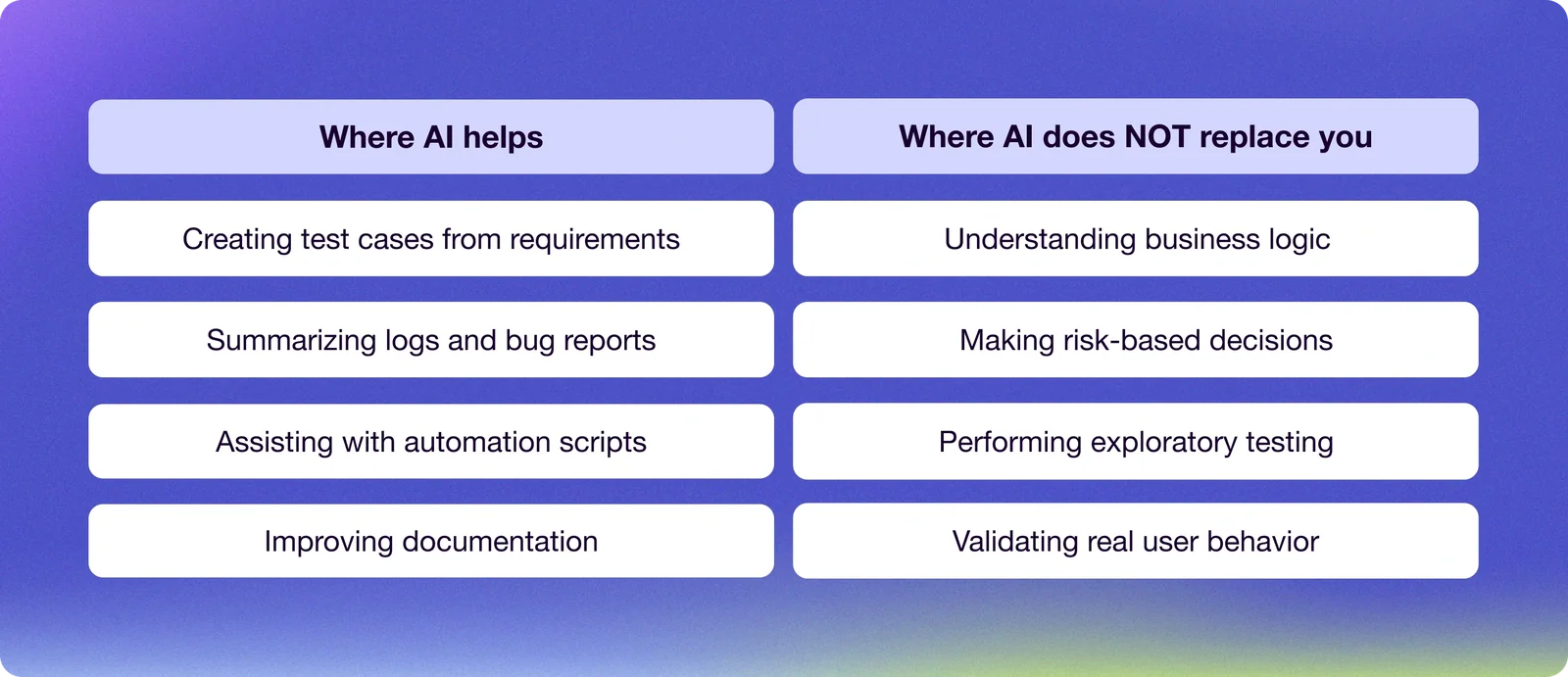
Where AI Actually Helps (and Where It Doesn't)
Before diving into specific use cases, it helps to understand where AI fits in a QA workflow. Not everything benefits from AI, and knowing the difference saves time and avoids frustration. A strong QA engineer uses AI as a support tool, not as a decision-maker.
Practical Ways to Use AI in Your QA Workflow
The following sections cover six specific areas where AI can make a real difference in your day-to-day work. Each one includes concrete examples and important caveats to keep in mind.
1. Generate Better Test Cases
One of the most immediate benefits of AI is speeding up test case creation. Instead of starting from scratch, you can input a user story, feature description, or acceptance criteria and get a structured list of test scenarios in seconds.
For example, given the requirement "User can reset password via email," AI can generate scenarios covering the valid email flow, invalid email formats, expired token handling, multiple reset requests, and security edge cases. This gives you a solid starting point that would otherwise take 30 to 60 minutes to draft manually.
The value here is twofold. First, you avoid missing obvious scenarios that are easy to overlook when you're deep in the product. Second, you save time on initial drafts and can focus your energy on refining test cases based on business rules and system behavior.
That said, AI suggestions are often generic. They require domain-specific adjustments. AI doesn't fully understand your product. It may get button names wrong, miss edge cases specific to your architecture, or suggest flows that don't match your actual implementation. This is where your role becomes critical: providing corrections, refining outputs, and ensuring accuracy.
In real projects, I typically use AI to generate an initial set of test cases and then refine them based on what I know about the system. The result is faster coverage without sacrificing quality.
2. Enhance Exploratory Testing
Exploratory testing is where QA engineers add the most value. It requires creativity, intuition, and experience. These are qualities that can't be automated.
AI supports this process by suggesting edge cases you may not have considered, generating "what could go wrong" scenarios, and providing alternative user flows. Think of it as a brainstorming partner that never runs out of ideas.
A practical approach: describe the feature to AI before starting an exploratory session, ask for potential risks or unusual behaviors, and use that as a checklist during testing. This enhances your exploration without replacing your judgment.
In my experience, this approach helps uncover edge cases faster. You're not limiting your exploratory process. You're augmenting it with a broader initial scope.
3. Write Automation Scripts Faster
For QA automation engineers, writing and maintaining scripts can be time-consuming. AI helps by generating test scripts in frameworks like Selenium, Playwright, or Cypress. It can also explain existing code when you're onboarding to a new codebase, or help debug failing tests by analyzing error patterns.
You can convert manual test cases into automation scripts, generate page object models, or get suggestions for assertions and validations. All of this in a fraction of the time it would take to write from scratch.
However, AI-generated code comes with caveats. It often needs refactoring to match your framework structure. It may include inefficient logic or outdated patterns. A skilled QA automation engineer uses AI to accelerate coding, not to replace the understanding of what the code does and why.
At Devlane, our QA engineers working on fintech platforms use AI to speed up script generation while maintaining the rigor required for payment systems and compliance-sensitive features.
4. Debug Faster
Bug investigation is one of the most time-intensive parts of QA engineering. Reading through logs, correlating timestamps, and identifying the root cause can take hours, especially in complex distributed systems.
AI helps by summarizing logs, identifying patterns in errors, and suggesting possible root causes. Instead of manually reading thousands of lines, you can paste logs into AI, ask for a summary, and identify key failure points in minutes.
This is especially useful when debugging issues reported by end users. The descriptions are often vague ("the app crashed when I did something"), and AI can help you map symptoms to potential causes faster than manual investigation.
5. Improve Test Documentation
Documentation is often overlooked but critical for any QA engineer. Good documentation ensures knowledge transfer, reduces onboarding time, and creates a foundation for automation.
AI helps you convert notes into structured documentation, improve clarity and readability, and standardize test case formats across your team. This is particularly useful when writing test plans, documenting regression suites, or creating onboarding materials for new team members.
In my case, AI helped me reduce the time spent on tasks like test documentation, which allowed me to focus more on analysis, exploration, and thinking through more complex scenarios. The time saved on documentation can be redirected to actual testing, which is where QA engineers create the most value.
6. Prepare for a QA Engineer Job
AI is also a powerful tool for career growth. If you're targeting a new QA engineer position, you can use AI to improve your QA engineer resume by identifying gaps and strengthening descriptions, practice interview questions with realistic scenarios, simulate real QA situations to sharpen your thinking, and generate portfolio project ideas that demonstrate practical skills.
For example, you can prompt AI with "Give me real-world test scenarios for a fintech app" or "Simulate a QA interview for a senior-level role." This helps you prepare for real-world expectations, not just theory.
Whether you're looking for remote QA engineer jobs, exploring software QA engineer jobs, or searching for a QA engineer vacancy at a specific company, AI can help you tailor your application materials and prepare for technical interviews.
And if you're wondering about QA engineer salary expectations, AI can help you research market rates by location, experience level, and industry. This is especially useful when negotiating offers or evaluating whether a role matches your career goals.
.webp)
The key to getting value from AI is treating it like a junior team member. You wouldn't accept their first draft without review, and you wouldn't let them make decisions without context. Give AI specific prompts with enough background to be useful. Review what it produces and refine it based on what you know about the system. The goal is to save time on the mechanical parts of your work so you can focus on the parts that require judgment.
Conclusion
AI is changing how software is tested, but it doesn't eliminate the need for skilled QA engineers. It shifts the focus from repetitive tasks to higher-value activities: analysis, exploration, and quality strategy.
Companies that hire QA engineers today are looking for professionals who can leverage these tools effectively. A modern QA engineer who understands how to use AI will work faster and deliver better results. Whether you're focused on manual testing or aiming to grow into a QA automation engineer, integrating AI into your workflow is becoming a key differentiator.
For me, that's the key: using AI as support. It doesn't replace the QA's judgment, but it definitely helps you work faster and more efficiently. The goal is not to rely on AI, but to use it strategically. By doing so, you position yourself for long-term growth and stand out in an increasingly competitive market.
Looking to grow your QA career? Devlane connects top QA talent from Latin America with leading tech companies in North America. Check out our open positions.


Other Blog Posts
.webp)
How to Build an AI Agent for Production